
MP3 Audio Recorder v12.10
Commercial demo
Vista / Win7 / Win8 / WinXP
Vista / Win7 / Win8 / WinXP
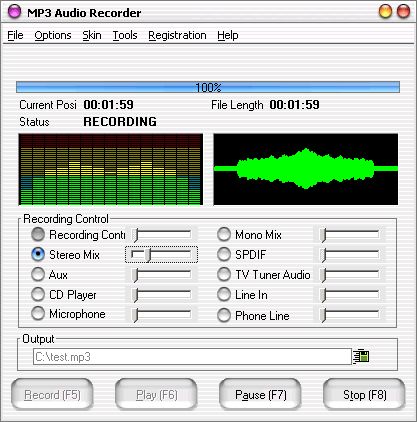
MP3 Audio Recorder can record sound from microphone, line-in, streaming audio or media applications in Windows.
Key Features:
Download provides a commercial demo.
Key Features:
- Save Recording files in WAV / MP3 format. It makes MP3 files directly, no need temporary files and to waste much time converting it to another format.
- Audio Editor. You can cut/copy/paste recording file.
- Scheduler. You can start recording at a set time in any given day,the recording file you can name yourself or be generated automatically by system.
- Windows Vista, Windows 7 and Windows 8 Compatibility. Support Microsoft's new operation system Windows Vista, Windows 7 and windows 8.
- Background recording mode. You can set hot key to hide or display software interface. The default is "CTRL+S".
- Write down audio information to recording file. You can write title, artist, album, composer, track, and year to recording file.
- Support multi sound cards.
- Change skin. You can customize MP3 Audio Recorder with more than a dozen skins. The default is Mac-style.
- Hot key. You can use F5 (record) F6 (play) F7 (pause/continue) F8 (stop) to finish the work. This'll avoid the noises when you click the mouse.
- User-friendly interface. It's easy to use MP3 Audio Recorder.
Download provides a commercial demo.
Screenshots:
HTML code for linking to this page:
Keywords:
mp3 audio recorder
record mp3
record from pc
License type
Commercial demo1
Author's homepage
Visit the author's site
Date added
15 Jul 2016
Downloads
147
File size
6.69 MB
(<1min @ 1Mbps)
Supported languages
English
Operating systems
Vista / Win7 / Win8 / WinXP1
1License and operating system information is based on latest version of the software.
(No user ratings yet)

