
DvdReMake Pro v3.6.1

Commercial demo
Win2k / Win95 / Win98 / WinME / WinNT / WinXP
Win2k / Win95 / Win98 / WinME / WinNT / WinXP
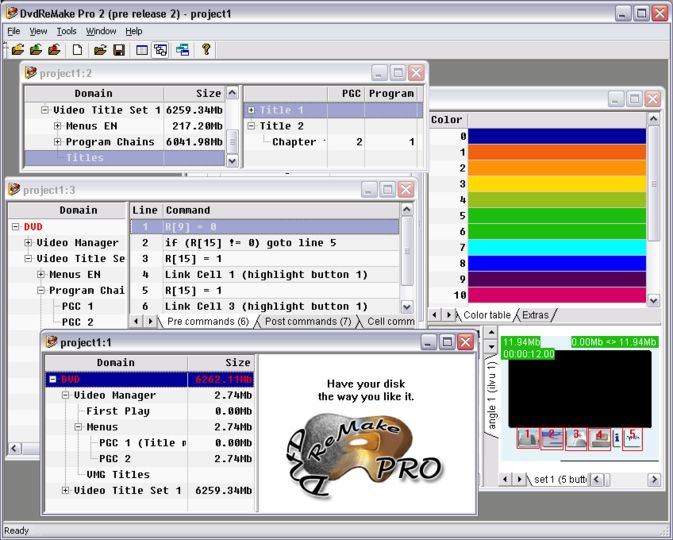
DvdReMake Pro is a powerful, yet intuitive DVD editor that will let you change content, appearance and navigation of a DVD disk without the need for complete disk re-authoring.
In addition to DvdReMake, DvdReMake Pro has the following features:
·Edit VM commands (all commands and valid combinations are supported);
·Modify buttons and color schemes in either still or motion menus;
·Easily change highlights colors;
·Edit and create new TitleSets, Titles, Chapters, ProgramChains, Programs;
·Move TitleSets, ProgramChains, commands within the disk or between different DVDs.
DvdReMake makes difficult things look easy. Ever wanted to understand what is on your disk and have a full control of the backup? Then this program is for you, try importing disk into DvdReMake and see for yourself.
DvdReMake has features that make it a very handy tool for editing dvds or making DVD backup:
·Process DVDs with seamless playback and multiple angles
·Remove unwanted buttons from either still or motion menus
·Re-link menu buttons
·Change DVD navigation
·Delete menus for selected language
·Cut out credits or embedded studio logos
·Replace material on the DVD with your own
·Remove warning/rating screens
·Remove menu transitions
·Actually, remove any scene from the disk. No more splitting disks - have what you like on your disk (movie or extra, or even part of this and part of that) with the original menu by simply removing what you don't want to see on the disk.
This demo version is limited and does not have the capability of exporting edited DVD. You can still test all the features of the software and decide if it suits your needs.
In addition to DvdReMake, DvdReMake Pro has the following features:
·Edit VM commands (all commands and valid combinations are supported);
·Modify buttons and color schemes in either still or motion menus;
·Easily change highlights colors;
·Edit and create new TitleSets, Titles, Chapters, ProgramChains, Programs;
·Move TitleSets, ProgramChains, commands within the disk or between different DVDs.
DvdReMake makes difficult things look easy. Ever wanted to understand what is on your disk and have a full control of the backup? Then this program is for you, try importing disk into DvdReMake and see for yourself.
DvdReMake has features that make it a very handy tool for editing dvds or making DVD backup:
·Process DVDs with seamless playback and multiple angles
·Remove unwanted buttons from either still or motion menus
·Re-link menu buttons
·Change DVD navigation
·Delete menus for selected language
·Cut out credits or embedded studio logos
·Replace material on the DVD with your own
·Remove warning/rating screens
·Remove menu transitions
·Actually, remove any scene from the disk. No more splitting disks - have what you like on your disk (movie or extra, or even part of this and part of that) with the original menu by simply removing what you don't want to see on the disk.
This demo version is limited and does not have the capability of exporting edited DVD. You can still test all the features of the software and decide if it suits your needs.
Screenshots:
HTML code for linking to this page:
Keywords:
dvdremake
dvd
remake
editor
authoring
remove
menu
License type
Commercial demo1
Author's homepage
Visit the author's site
Date added
17 Dec 2007
Downloads
32,091
File size
1.45 MB
(<1min @ 1Mbps)
Operating systems
Win2k / Win95 / Win98 / WinME / WinNT / WinXP1
1License and operating system information is based on latest version of the software.
(No user ratings yet)

